Apple M5 vs M6: A Big Architectural and AI Transition You Need to Know
If you bought an M5 MacBook Air, 14-inch MacBook Pro or iPad Pro, the arrival of Apple’s M6 chip may leave you wondering how quickly your new machine has been overtaken. The short answer is: it hasn’t.
M5 remains a very capable Apple Silicon generation. For everyday computing, office work, browsing, coding, photo editing and most creative workloads, an M5 Mac or iPad Pro is still going to feel extremely fast for years to come.
M6 is nevertheless important. Apple has used the generation to make a more substantial architectural change than the usual increase in CPU and GPU performance. It is Apple’s first 2nm chip, introduces a new 12-core CPU design, moves to a 12-core GPU with Neural Accelerators and, most significantly, introduces a Dual 16-core Neural Engine.
Apple says M6 can deliver up to 1.2x the multithreaded CPU performance of M5, nearly 30% higher peak GPU compute for AI and up to twice the peak Neural Engine compute.
That makes M6 particularly interesting for something that is becoming increasingly important to Mac buyers: local AI.
So if you already own an M5 device, should you care? And if you are choosing between an M5 Mac and an M6 Mac, which generation makes more sense?
M5 vs M6 at a glance
| Feature | Apple M5 | Apple M6 |
| Manufacturing process | 3nm generation | 2nm |
| CPU | Up to 10-core | 12-core |
| M6 CPU design | — | 2 super + 4 performance + 6 efficiency cores |
| GPU | Up to 10-core | 12-core |
| GPU Neural Accelerators | Yes | Yes, in every GPU core |
| Neural Engine | 16-core | Dual 16-core |
| Hardware ray tracing | Yes | Yes |
| Unified memory bandwidth | 153GB/s | Up to 170GB/s 153GB/s for 16GB, 170GB/s for 24 and 32GB |
| Unified memory | Depends on device | Up to 32GB on M6 Mac mini |
| Media engine | H.264, HEVC, ProRes, ProRes RAW, AV1 decode | H.264, HEVC, ProRes, ProRes RAW, AV1 decode |
| Main emphasis | Performance, efficiency and on-device AI | Performance, efficiency and substantially greater AI compute |
| First M6 device | — | Mac mini |
| Best reason to upgrade | — | AI workloads, demanding CPU/GPU work and buying a new Mac |
The important point is that M6 is not simply “M5 with two extra CPU cores”. The architecture underneath it has changed considerably.
What is actually different about M6?
There are four specifications worth paying attention to.
1. M6 moves Apple to 2nm
The manufacturing process is probably the least visible change to a user, but it is one of the most important technically. M6 is Apple’s first chip built using a 2nm process. The smaller process allows Apple to pack greater transistor density into the chip while improving the balance between performance and power consumption.
You won’t see a “2nm mode” appear in macOS. The benefit should instead show up indirectly through faster processing, improved efficiency and more computing capability within the same compact form factor. This matters particularly in machines such as the Mac mini, where Apple can combine a small enclosure with sustained desktop performance.
2. The CPU changes more than the core count suggests
M5 has a 10-core CPU consisting of four super cores and six efficiency cores.
M6 moves to a new 12-core CPU consisting of two super cores, four performance cores and six efficiency cores. Apple says this delivers up to 1.2x the multithreaded performance of M5, alongside the fastest single-threaded performance Apple claims for an M-series chip. That is useful for workloads such as:
- compiling code
- photo processing
- video editing
- file indexing
- large exports
- running multiple applications
- demanding multitasking
- agentic AI workloads
For normal web browsing and email, however, an M5 machine was already more than fast enough. The additional CPU performance is therefore much more interesting for people who regularly make their computers work hard.

3. The GPU has Neural Accelerators in every core
M6 has a 12-core GPU, compared with up to 10 GPU cores in the standard M5. More importantly, Apple has equipped each M6 GPU core with a Neural Accelerator. Apple says this contributes to nearly 30% higher peak GPU compute for AI compared with M5.
This is where the M6 story starts to move beyond traditional graphics performance. The GPU isn’t just there for games, video effects and 3D rendering. Increasingly, it is part of the hardware used to accelerate AI workloads. That matters for local large language models, image generation, AI-assisted photo editing and other applications that can take advantage of Apple’s on-device frameworks.
4. The Neural Engine is now effectively doubled
This is probably the most interesting change for the future. M5 has a 16-core Neural Engine. M6 introduces a Dual 16-core Neural Engine. Apple says the two engines can be used simultaneously by system frameworks, providing up to twice the peak Neural Engine compute of the previous generation.
This doesn’t mean every AI application will suddenly run twice as fast. Software needs to be designed to take advantage of the hardware, and different AI workloads use different parts of the chip. It does show where Apple believes computing is heading. AI is becoming another fundamental workload alongside CPU processing and graphics.
M5 already has a surprisingly strong AI architecture
It would be easy to look at the M6 and conclude that M5 is suddenly an old chip.
It isn’t.
The M5 already includes Neural Accelerators, hardware-accelerated ray tracing and a 16-core Neural Engine, alongside 153GB/s memory bandwidth.
That is true of the M5 MacBook Air and 14-inch MacBook Pro. The M5 iPad Pro also has Neural Accelerators, ray tracing, a 16-core Neural Engine and 153GB/s memory bandwidth. Its exact CPU configuration varies by storage capacity: the 256GB and 512GB models have a 9-core CPU, while the 1TB and 2TB models have a 10-core CPU.
So M5 owners shouldn’t interpret M6 as evidence that their hardware is inadequate for AI. Quite the opposite. M5 is part of the generation in which Apple Silicon was already being designed around on-device AI. M6 simply pushes that idea considerably further.
What does this mean if you own an M5 MacBook Air?
The M5 MacBook Air is probably the clearest example of why specifications need some context. The current 13-inch M5 MacBook Air has a 10-core CPU, an 8-core GPU in its base configuration, a 16-core Neural Engine and 153GB/s memory bandwidth. It can be configured with the 10-core GPU and up to 32GB of unified memory.
For day to day computing up to compute intensive tasks there is little reason to pack about M6
- Safari
- Microsoft 365
- Google Workspace
- Zoom
- programming
- Photoshop
- Lightroom
- general photo editing
- light video editing
- school and university work
- everyday AI features
The M5 MacBook Air is already an exceptionally capable everyday computer.
Where M6 could make a difference
The difference becomes more interesting if your workload involves:
- running local LLMs
- AI image generation
- large AI models
- AI-assisted video processing
- heavy software compilation
- sustained CPU workloads
- multiple demanding applications
- experimenting with local AI agents
Even then, memory capacity can matter more than the generation number. A 32GB M5 MacBook Air can be a better local-AI machine for a particular workload than a 16GB M6 machine simply because it has more memory available for the model and other applications. That is an important point to keep in mind when comparing Apple Silicon generations.
What about the M5 14-inch MacBook Pro?
The M5 14-inch MacBook Pro is a different proposition because the machine has Apple’s active cooling system and a better display and connectivity package. The standard M5 version has:
- 10-core CPU
- 10-core GPU
- 16-core Neural Engine
- 153GB/s memory bandwidth
- 16GB, 24GB or 32GB unified memory
- hardware ray tracing
- ProRes media engines
- Liquid Retina XDR display
- ProMotion up to 120Hz
For an owner of this machine, M6 doesn’t suddenly create a compelling upgrade case. If you bought the M5 MacBook Pro for video editing, photography, coding or general professional work, you have a machine with considerable headroom. The case for moving to M6 is strongest when you are buying a new machine anyway or your workload has changed substantially.

And the M5 iPad Pro?
The M5 iPad Pro is an even more interesting comparison because Apple has put the chip into an extremely thin tablet. The M5 iPad Pro has a 10-core GPU, Neural Accelerators, hardware ray tracing, a 16-core Neural Engine and 153GB/s memory bandwidth. The 256GB and 512GB versions have 12GB of RAM, while 1TB and 2TB models have 16GB.
For an M5 iPad Pro owner, M6 is not a reason to upgrade simply because the processor is newer. The M5 iPad Pro is already powerful enough for demanding creative applications, graphics work, multitasking and Apple’s on-device AI features.
The bigger limitation for some users may actually be iPadOS and application support, rather than the raw capability of the M5 chip. If an application doesn’t take advantage of additional M6 AI hardware, the difference between the two generations becomes much less meaningful.

M6 is really an AI story
This is the part of the M6 announcement I think is most important. Apple isn’t simply adding CPU and GPU cores. It is building a chip around the assumption that AI workloads will become a normal part of computing. Apple specifically talks about M6 handling:
- on-device LLMs
- AI agents
- file indexing
- image processing
- coding
- creative applications
- AI-assisted workflows
Apple even highlights local LLM prompt processing in LM Studio and says M6 Mac mini can deliver up to 4.8x the prompt-processing performance of M4 in that test. That doesn’t mean an M6 Mac is automatically 4.8 times faster than an M5 Mac for every AI workload. It is an Apple-selected comparison against M4, not a general M6-versus-M5 performance figure. It does, however, demonstrate the direction Apple is taking.
This matters for local AI
I’ve been looking at local AI as an increasingly useful way to use modern Macs.
A local AI setup can run an LLM directly on your computer using applications such as Ollama or LM Studio. You can then build things around it, including document assistants, research tools, coding assistants and eventually AI agents.
For those workloads, three things matter particularly:
- Memory capacity: How much of the model can you keep in unified memory?
- Memory bandwidth: How quickly can data move between the processor and memory?
- AI compute: How quickly can the system process the mathematical operations required by the model?
M6 improves the latter two. But M5 machines with 24GB or 32GB can still be very useful local-AI computers. This is why I wouldn’t recommend an M5 owner sell their Mac simply because M6 exists.

M6’s 170GB/s memory bandwidth needs a small footnote
The original comparison table makes the M6 bandwidth look like a straightforward 153GB/s versus 170GB/s upgrade. There is a little more to it. Apple’s M6 Mac mini specifications list 153GB/s for the base 16GB configuration, while the 24GB and 32GB configurations are specified at 170GB/s.
So the fairest comparison is:
| Memory configuration | M5 | M6 |
| Standard M-series bandwidth | 153GB/s | 153GB/s on 16GB M6 |
| Higher-memory M6 | — | 170GB/s on 24GB/32GB configurations |
That makes the 170GB/s figure important, but it isn’t something every M6 Mac automatically gets.
As always with Apple Silicon, the amount of unified memory you buy is just as important as the processor generation for workloads such as local AI.
M5 vs M6: what will you actually notice?
Here’s the practical version.
| Workload | M5 | M6 |
| Web browsing | Excellent | Faster than necessary |
| Office work | Excellent | Faster than necessary |
| Excellent | Faster than necessary | |
| General multitasking | Excellent | Better |
| Coding | Excellent | Better for larger projects |
| Photo editing | Excellent | Faster for demanding workloads |
| Video editing | Excellent | Faster |
| 3D rendering | Very capable | Faster |
| Gaming | Very capable | Better GPU performance |
| Local LLMs | Very capable | Better |
| AI image generation | Very capable | Better |
| AI agents | Capable | More headroom |
| Large local AI workloads | Memory-dependent | Better, but still memory-dependent |
For most people, the M6 advantage will show up as more headroom, rather than a completely different computing experience. An M5 Mac doesn’t suddenly become slow when M6 arrives.
Should an M5 owner upgrade to M6?
For most M5 owners: no.
If you already own an M5 MacBook Air, M5 14-inch MacBook Pro or M5 iPad Pro, the M6 announcement isn’t a good reason on its own to replace your device.
I’d look at upgrading only if one of these applies:
You need substantially more performance: If your M5 machine is regularly hitting its limits during video exports, software compilation, 3D rendering or other demanding workloads, M6 gives you a meaningful performance step.
You want to experiment seriously with local AI: This is perhaps the most interesting reason. M6’s stronger GPU AI acceleration and Dual Neural Engine make it a more attractive platform for local AI experimentation. But again, look at memory first. A 32GB M5 can remain a better choice than a 16GB M6 for some local AI workloads.
You are replacing your machine anyway: This is the simplest situation. If you’re already buying a new Mac, there is little reason to buy M5 simply because it is still fast, unless you find a substantial discount. M6 is the newer architecture and gives you more AI headroom and longer runway.
What about buying an M5 now?
This is where things become interesting. The arrival of M6 should make M5 Macs more attractive if retailers discount existing stock. An M5 MacBook Air with 24GB or 32GB of memory could be an excellent buy if its price drops significantly. The same applies to the M5 14-inch MacBook Pro.
I’d rather have:
M5 + 34 or 32GB
than automatically choose:
M6 + 16GB
for someone specifically interested in local AI.
The model you intend to run, its quantisation, context size and available memory will determine what your computer can realistically handle.
The M6 architecture is faster, but memory remains a fundamental constraint.
The M6 Mac mini changes the buying equation
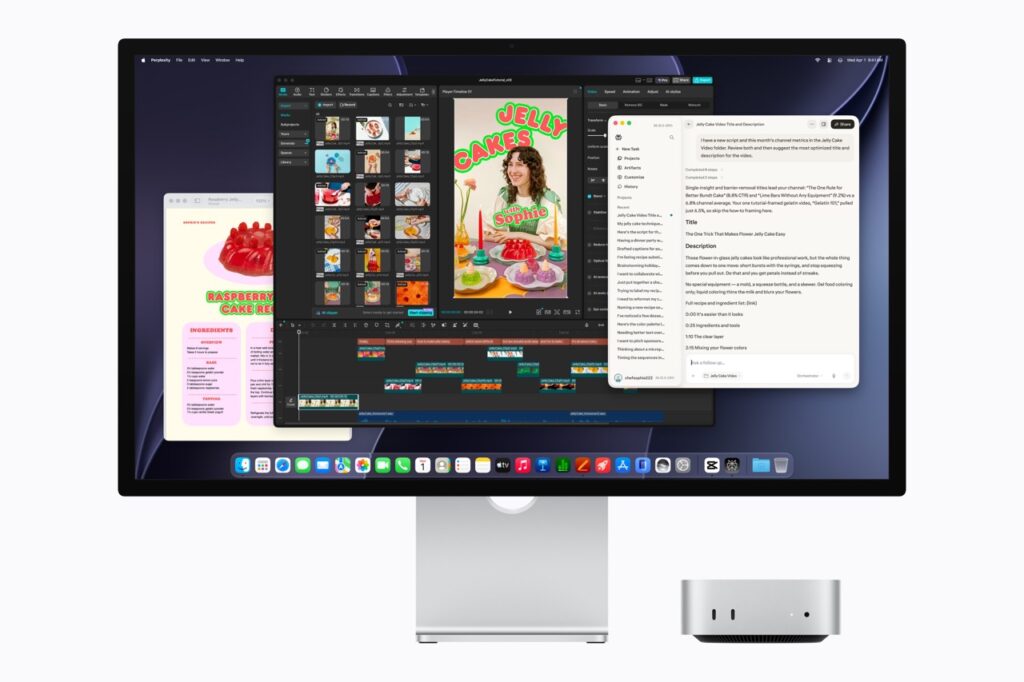
The first M6 machine is not a MacBook. It is the Mac mini. Apple launched the M6 Mac mini with a 12-core CPU, 12-core GPU and Dual 16-core Neural Engine. It starts with 16GB of unified memory and can be configured with 24GB or 32GB. UK pricing starts at £899 for the standard M6 Mac mini.
That makes the M6 particularly interesting for people who want to build a desktop local-AI machine. A Mac mini can sit permanently on a desk, connect to a large monitor, external storage and networking, and remain available to run AI workloads. That is a different proposition from upgrading an M5 MacBook Air simply because a newer processor exists.
For a Colour My Tech reader building a local AI setup, an M6 Mac mini with 24GB or 32GB of unified memory could be a particularly interesting machine.
M5 vs M6: the upgrade verdict
The M6 is a significant generation. The move to 2nm, the redesigned 12-core CPU, 12-core GPU, Neural Accelerators and Dual 16-core Neural Engine make it more than a routine specification refresh.
Apple has also made its intentions fairly clear. AI is becoming a first-class workload for Apple Silicon. That makes M6 exciting for people building local AI systems, running LLMs, experimenting with AI agents or using increasingly sophisticated AI features in creative software.
But that doesn’t make M5 obsolete.
- If you own an M5 MacBook Air, you already have an extremely capable everyday computer.
- If you own the M5 14-inch MacBook Pro, you have even more performance and sustained workload capability.
- And if you own an M5 iPad Pro, the processor is still considerably more capable than most of the software currently requires.
The better way to think about M6 is as the next step in Apple’s move towards AI-heavy personal computing, rather than a signal that M5 owners need to upgrade.
The bottom line
Already own M5? Keep it. There is no compelling reason to replace a perfectly good M5 machine purely because M6 has arrived.
Buying a new Mac? Look at M6 first. It is the newer architecture and gives you more CPU, GPU and AI capability.
Building a local AI machine? Pay close attention to memory. An M5 with 24GB or 32GB can still be a very capable local AI computer, while an M6 with 16GB may be more constrained by memory than the processor specification suggests.
Looking for value? Watch M5 prices. The arrival of M6 could make discounted M5 MacBook Air and MacBook Pro models particularly attractive. And that may be the most useful conclusion of all.
The M6 is an important architectural step forward. It doesn’t make the M5 generation a mistake. It makes the M5 generation an increasingly interesting value proposition.