Stop Complaining About 8GB RAM: Why the MacBook Neo’s Limitation Is Actually a Feature
There’s been an outcry. Tech forums are buzzing. Reviewers are skeptical. Apple launched its new MacBook Neo — a sleek, fanless 13-inch laptop for just $599 ($499 with education discount) and reviewers immediately pounced on one spec: 8GB of unified memory.
In 2026, with laptops shipping 16GB, 32GB, even 64GB as standard, how can Apple possibly justify only 8GB?
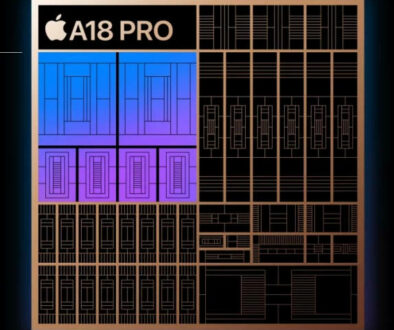
But what if we told you this isn’t a flaw… but a feature by design? The A18 Pro chip has a fixed memory limited to 8GB and it uses fast LPDDR5X RAM. This 8GB memory is attached directly above the A18 Pro SoC (System on a Chip) using integrated FanOut Package on Package (InFO-PoP) technology, which physically limits the amount of memory that can be included.

What if Apple didn’t cut corners — they redrew the blueprint?
Let’s challenge the narrative: The MacBook Neo’s 8GB RAM isn’t a limitation. It’s proof that Apple’s ecosystem is working better than ever.
“Running 60 apps on the MacBook Neo didn’t crash macOS, with video streaming also happening comfortably, putting an end to the cries that 8GB RAM is insufficient.”
An equivalent laptop PC running the same number of apps would be throttled and even freezes and reboots as seen by a number of reviewers performing said comparison.
The Myth of “More RAM = Better Performance
We’ve been conditioned to believe more RAM is always better. But in a world of bloated software and inefficient code, “more” often masks poor optimisation.
Not so with Apple.
Thanks to the A18 Pro chip, the same silicon that powers the iPhone 16 Pro — the MacBook Neo leverages unified memory architecture (UMA). This means the CPU, GPU, and Neural Engine all share the same high-speed pool of RAM, eliminating bottlenecks from copying data between separate memory banks.

This allows macOS to use RAM far more efficiently than traditional x86 systems. Apps launch faster. Switching is seamless. Video playback is smooth, even at 8K with ProRes support.
And because everything runs on the same ARM architecture as iOS, apps are leaner, cleaner, and purpose-built.
So while a Windows laptop might need 16GB to keep up with 20 browser tabs, the MacBook Neo delivers the same experience with half the memory, not because it’s underpowered, but because it’s over-optimised.
Unified Memory Architecture (UMA)
Here is how Apple has the upper hand when it comes to designing their own ecosystem, from chip to software, end-to-end.
No Dedicated VRAM: MacBooks with Apple Silicon use a “unified” memory pool, meaning the CPU and GPU share the same high-bandwidth RAM. This eliminates the need to copy data between CPU and GPU, allowing 8GB of RAM on a Mac to handle tasks that would cause a 16GB Windows laptop to stutter.
Efficient Swapping: When memory fills up, macOS is highly optimised to move data to the fast SSD (swapping) without the entire system stuttering or crashing, whereas Windows PCs often freeze or crash when RAM is exhausted. This process is seamless and as fast as switching from one app to the next without any lag.
Hardware and Software Integration: Because Apple creates both the M-series and A-series chips and the macOS software, they are designed to work together perfectly.

Efficiency Over Excess: A Chip Designed for Real-World Use
The A18 Pro wasn’t built for synthetic benchmarks. It was built for real people doing real things: students taking notes, creatives editing short videos, professionals managing emails, and coders writing scripts. The synthetic benchmark only tells half the story. If you love apps like Canva, Capcut and even those that do the heavy lifting like VEED.io, Clipchamp, Lapwing, Adobe Suite, Visme and Figma will feel at home with the MacBook Neo.
For these tasks, 8GB is not a ceiling, it’s a sweet spot.
Apple’s aggressive memory compression, intelligent app suspension, and background process management mean that even with multiple apps open, your active work stays snappy. The system prioritises what you’re using right now, not what you might use later.
Plus, with up to 16 hours of video playback, the MacBook Neo proves that efficiency beats raw specs. You don’t need 32GB of RAM if your battery dies in 5 hours.
This is computing reimagined: not as a race for numbers, but as a pursuit of fluid, uninterrupted workflow.
MacBooks are known for efficient performance, often running cooler and quieter under load compared to Windows laptops, which can overheat when trying to manage multiple heavy apps simultaneously, causing them to crash to prevent damage.

How you can take your MacBook Neo Further
Ecosystem Magic: Your iPhone Is Your Extra RAM
Here’s where Apple flips the script completely.
While other laptops rely solely on internal specs, the MacBook Neo gains invisible performance boosts through ecosystem integration.
With iPhone Mirroring, you can run your iPhone apps directly on your Mac. Need to check a message? Edit a photo? Reply to an Instagram DM? Do it right from your MacBook Neo without switching devices.
Your iPhone becomes an extension of your workspace. Its processing power, storage, and even cellular connection offload tasks from your laptop.
In essence, your phone acts like external RAM not in bytes, but in functionality.
You don’t need 16GB when your entire digital life is seamlessly connected and distributed across devices.
Seamless Handoff: Your Ecosystem, Your Workflow
The magic of the MacBook Neo doesn’t stop at using your iPhone as a functional extension. Apple’s ecosystem is built on seamless continuity, allowing you to start a task on one device and pick it up instantly on another, all without missing a beat.
This is where Handoff transforms from a neat trick into an essential productivity superpower.
Imagine this: You’re browsing articles or researching on your iPhone during your commute. When you get home, you open your MacBook Neo, and that same webpage appears instantly in Safari, ready for you to keep reading, take notes, or share. No copying links. No searching again. Just pure flow.
Need to draft an email on the go? Start typing on your iPhone, then glide over to your Mac, and the message window pops up, cursor blinking, exactly where you left off. It works the same way with Messages, Calendar events, Maps directions, and even creative apps like Notes or Pages.
This fluid transition isn’t just convenient, it makes the 8GB RAM limitation feel less relevant. Why strain one device when your tasks can effortlessly float across devices, each handling what it does best?
Sidecar and Universal Control with even the entry level iPad
And when you need more than just continuity, when you need more screen space, that’s where Sidecar and Universal Control come in.
Even if you own the most affordable iPad (11th generation, 2025), you can use it as a wireless second display for your MacBook Neo via Sidecar. Turn it into a drawing canvas, extend your desktop for multitasking, or use it as a dedicated space for messages and notifications. The entire graphical interface streams smoothly over Wi-Fi, no cables required (though USB-C is an option for lower latency).
But Universal Control takes it further. With a single keyboard and trackpad, you can move your cursor from your MacBook Neo onto your iPad screen; dragging and dropping files, editing photos across devices, or controlling apps on both simultaneously. It feels like you’re working on one giant, unified computer.
So while other laptops rely solely on internal specs to deliver performance, the MacBook Neo leverages the power of your entire Apple ecosystem. Your iPhone handles background tasks. Your iPad becomes extra screen real estate. And features like Handoff, Sidecar, and Universal Control ensure everything works together — not as separate gadgets, but as one seamless digital experience.
In this light, 8GB of RAM isn’t a ceiling. It’s the core of a smarter, more connected kind of computing.
The Sustainability Argument: Less Waste, Longer Life
Let’s talk about longevity.
Most laptops are discarded not because they break, but because they slow down. Bloatware, OS updates, and rising RAM demands make older machines feel obsolete.
But Apple’s control over hardware and software means the MacBook Neo will likely receive 7+ years of OS updates, far longer than most budget Windows laptops.
And because macOS is optimised for UMA and efficient chips, it ages gracefully. That 8GB of RAM today will still be usable in 2029, thanks to ongoing software refinements.
By designing a device that doesn’t rely on excessive specs to stay relevant, Apple reduces e-waste and promotes sustainability.
Less material used. Less energy consumed. Less churn.
Who Is This For? (Spoiler: Not Everyone)
Let’s be clear: The MacBook Neo isn’t for video editors rendering 8K timelines. It’s not for developers running Docker containers and VMs.
It’s for:
- Students who need a lightweight machine for lectures and essays
- Digital nomads who value battery life and portability
- Casual creators editing social content or short films
- iPhone users who want a seamless second screen
For this audience, 8GB isn’t limiting, it’s liberating. It keeps the price low, the design thin, the battery long, and the thermal profile silent.
You’re not buying raw power. You’re buying freedom from fans, chargers, and dongles.

We’re Measuring the Wrong Thing
We keep judging the MacBook Neo by old rules as if it’s competing in the same arena as every other budget laptop.
It’s not.
It’s playing a different game: one where efficiency, integration, and intelligence matter more than gigabytes and clock speeds.
Complaining about 8GB RAM on the MacBook Neo is like complaining that a Tesla has no gas pedal.
It misses the point entirely.
Apple isn’t selling outdated tech.
They’re selling a vision of computing that’s smarter, quieter, and simpler where less really is more.
So before you write it off, ask yourself:
Do I need more RAM? Or do I just need my computer to work?
For millions of users, the MacBook Neo says: 8GB is enough. And that’s the point.